MyPassword
MyPassword is a free, open-source, offline password manager. All data is encrypted with AES-256-GCM and stored locally — nothing is sent to the cloud.
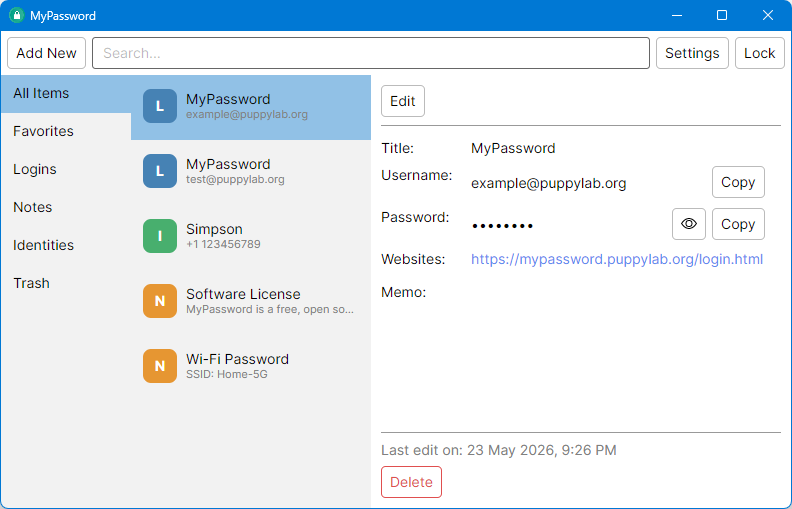
Download
Pre-compiled release can be downloaded from GitHub. Source code can also be get from GitHub.
The official chrome extension can be installed from Chrome Web Store.
Key Features
- Offline & local — your vault never leaves your device
- AES-256-GCM encryption — military-grade encryption with PBKDF2 key derivation (1M iterations)
- Three item types — Logins, Notes, and Identities
- Chrome extension — auto-fill, auto-save, and search from the browser
- Password generator — configurable length and character styles
- OAuth recovery — recover your vault with Google or Microsoft if you forget your master password
- Auto-lock — locks automatically after system idle (keyboard/mouse inactivity)
- Clipboard protection — copied passwords are cleared automatically
- Cross-platform — runs on Windows, macOS, and Linux
- Multi-language — English and Chinese
How It Works
Master Password ──> PBKDF2 ──> Wrapping Key ──> Decrypts DEK
                                                      |
                                                AES-256-GCM
                                                      |
                                                 Vault Data
Your master password derives a key that unwraps the Data Encryption Key (DEK). The DEK encrypts all vault items. Optionally, a second copy of the DEK is protected by your OAuth identity for recovery.
Documentation
- User Guide — features, usage, Chrome extension, settings
- Key Generation & Encryption — AES key generation, PBKDF2, OAuth recovery internals
- Backup Guide — how to back up and restore your vault
Quick Start
- Download the latest release for your platform
- Run
MyPassword.exe(Windows),MyPassword.app(macOS), orMyPassword(Linux) - Create a master password on first launch
- Start adding logins, notes, and identities
- Install the Chrome extension from
extension/chrome/for browser auto-fill
Requirements
- A modern desktop OS (Windows 10+, macOS 12+, or a recent Linux). The release is shipped as a self-contained Native AOT binary — no runtime install required.
- Chrome browser (for the extension)
Build from Source
The desktop app is a C#/.NET project compiled with Native AOT. From the repository root:
dotnet publish MyPasswordDesktop/MyPasswordDesktop.csproj \
    -c Release -r <rid> --self-contained true -o publish
Replace <rid> with your target runtime: win-x64, osx-arm64, osx-x64, or linux-x64. The standalone binary is written to publish/.